Overview
Webhooks are a way for your application to get real-time data from the Mimeeq platform. Instead of polling an API, you can set up a webhook to receive data as events happen — basket submissions, CRM changes, and other platform activity are pushed directly to your endpoint.
For how webhooks fit alongside client-side events and the REST API, see the Architecture Overview.
How Webhooks Work
When a specific event occurs in the Mimeeq system, we send an HTTP POST request with a JSON payload to your webhook's configured URL. Webhooks can be used to synchronise data between Mimeeq and external systems (ERP, CRM, PIM) or to trigger custom actions in your application — for example, sending a confirmation email when a basket is submitted, or updating a contact record in your CRM when it changes in Mimeeq.
Setting Up a Webhook
To set up a webhook, follow these steps:
- Log in to Mimeeq app.
- Navigate to Settings and look for the Data section.
- Select Webhooks to open the webhook management page.
- On the Webhooks page, you'll see an option to create New Webhook. Click on this button and provide the following webhook details:
- Webhook Name: A unique name for the webhook.
- Endpoint URL: The URL where you want to receive the webhook payloads.
- HTTP Auth Header Name and Value: If your endpoint requires authentication, you can provide the header name and value here.
- Event Types: Select the events for which you want to receive payloads.
- Click on 'Create' to save the webhook.
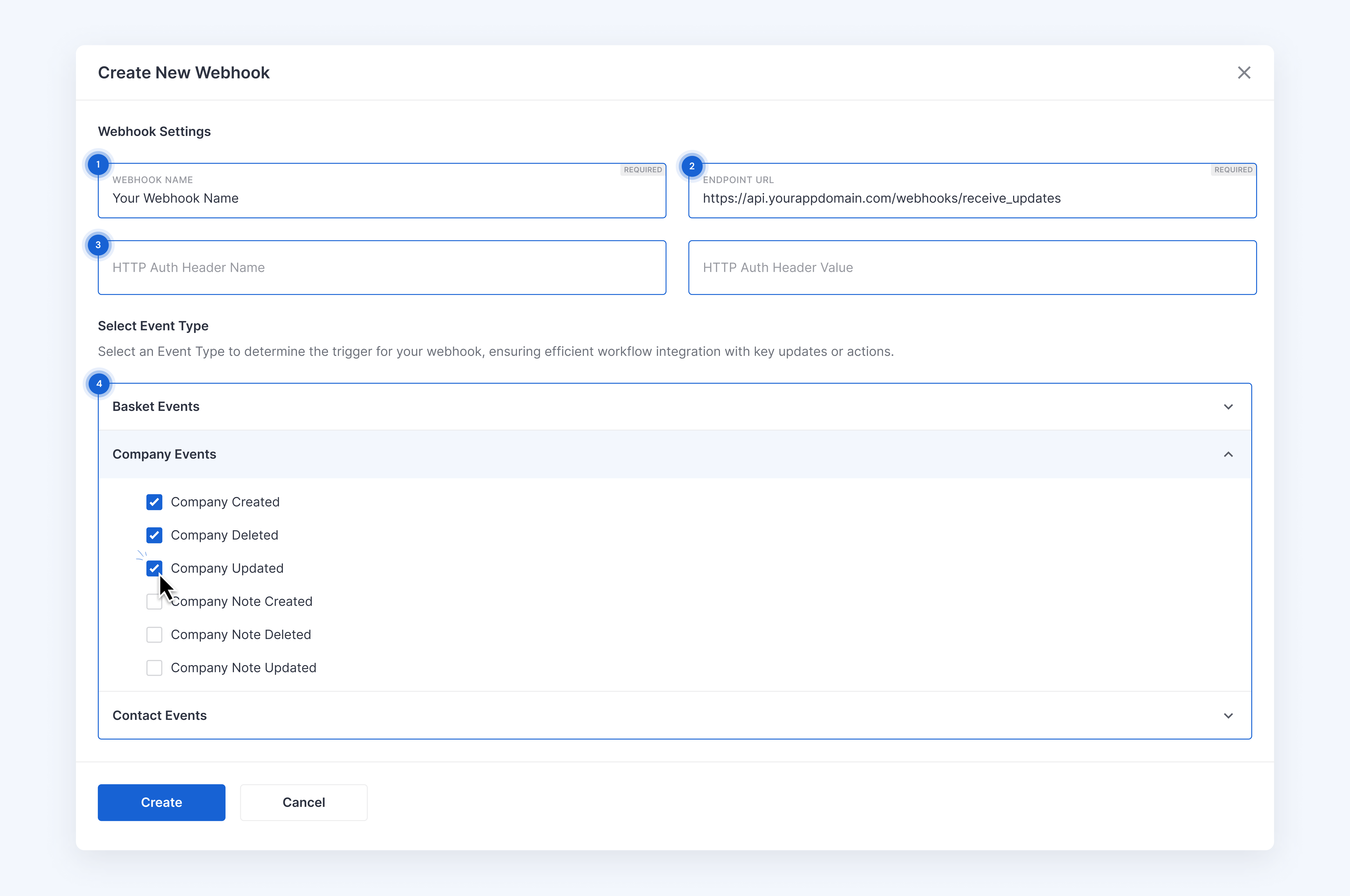
For admin setup instructions including webhook creation, testing, and log monitoring, see How to Use Mimeeq Webhooks.
Webhook Events
You can configure your webhook to receive data for the following events:
Basket
| Event Type | Triggered when... |
|---|---|
| basket-submitted | ... someone submits basket. |
Contact
| Event Type | Triggered when... |
|---|---|
| contact-created | ... a new contact is created. |
| contact-updated | ... changes are made to an existing contact. |
| contact-deleted | ... a contact is removed. |
Company
| Event Type | Triggered when... |
|---|---|
| company-created | ... a new company is created. |
| company-updated | ... changes are made to existing company. |
| company-deleted | ... a company is removed. |
| company-note-created | ... a new note is attached to a company's record. |
| company-note-updated | ... an existing note on a company's record is updated. |
| company-note-deleted | ... a note linked to a company is removed. |
Payload Format
Every webhook delivery wraps the event-specific data inside a standard envelope. The payload sent to your webhook URL will be in JSON format and will contain the following fields:
{
  "meta": {
    "webhookId": "WEBH-xxx",
    "eventId": "xxx",
    "eventType": "basket-submitted",
    "eventTimestamp": "2024-03-21T13:46:46Z",
    "entityId": "xxx",
    "version": "1.0"
  },
  "data": {
    /*specific data for the event*/
  }
}
The meta object is identical across all event types. The data object varies by event — see the individual payload pages for the full structure of each event type.
Meta Properties
| Field | Description |
|---|---|
| webhookId | The unique identifier of the webhook definition. |
| eventId | The unique identifier of the specific event. |
| eventType | The type of event that triggered the webhook. |
| eventTimestamp | The ISO 8601 timestamp when the event occurred. |
| entityId | The unique identifier of the main entity involved in the event. |
| version | The version of the payload format (currently 1.0). |
Authentication
If you need an extra layer of security you can define a custom authorization header which will be included in every request sent within the Webhook definition. It allows you to implement your own verification logic, which would filter out any request with missing or invalid authorization header.
For example, if you define a custom header x-webhook-secret with a value my-secret-key in the Webhook definition, the request sent to your endpoint will include the following header:
host: your-endpoint.com
content-type: application/json
content-length: 123
x-webhook-secret: my-secret-key
...
Responding to a Webhook
Your webhook endpoint should return a 2xx response to each webhook event. If the response is different than 2xx, we will retry the delivery. You can check the status of the last delivery attempt on the Webhook definitions list.
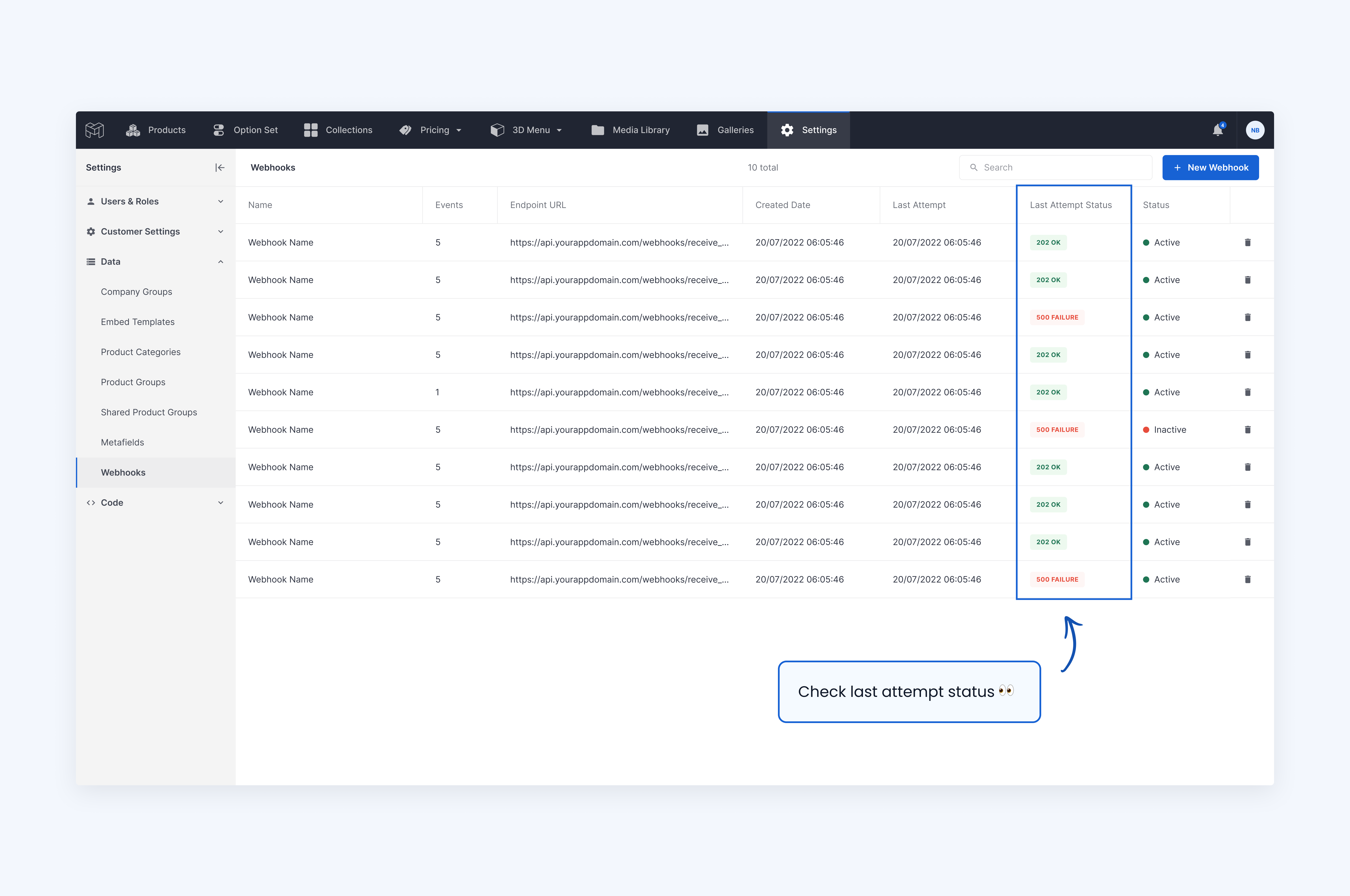
Events generated by testing webhooks are not counted as a last attempt.
Retry Policy
Mimeeq ensures reliable webhook delivery. If the original sending attempt fails due to a non-2xx response code or by exceeding a timeout of 10 seconds, we will retry the delivery up to 5 more times: after 15, 60, 225, 900, and 3600 seconds. If all retries are unsuccessful, the event will be marked as failed.
Best Practices
- Security: Always use HTTPS for your webhook endpoint to ensure data privacy and integrity.
- Validation: Validate the payload received from the webhook to ensure it's coming from Mimeeq. If you configured a custom authorization header, check it on every incoming request.
- Asynchronous Processing: If a webhook triggers a long-running process, consider using a processing queue for events and return a
202 Acceptedresponse immediately. As a webhook sender, Mimeeq doesn't need to know whether the event was processed successfully — only that it was delivered. Processing the event synchronously can lead to timeouts and unnecessary retries. - Deduplication: Ensure that your system can handle duplicate events. Webhooks are designed to be delivered at least once, so you may receive the same event more than once. Use the
eventIdfrom the meta properties to deduplicate. - Monitoring: Monitor the delivery status of your webhooks to ensure that you're receiving all the events. If you notice a high number of failed deliveries, investigate the cause and take corrective action.